Hover the left history rail to preview titles, then click one to open the full documentation here.
Developers2026-07-1710 minLive
Developer Portal Workflow
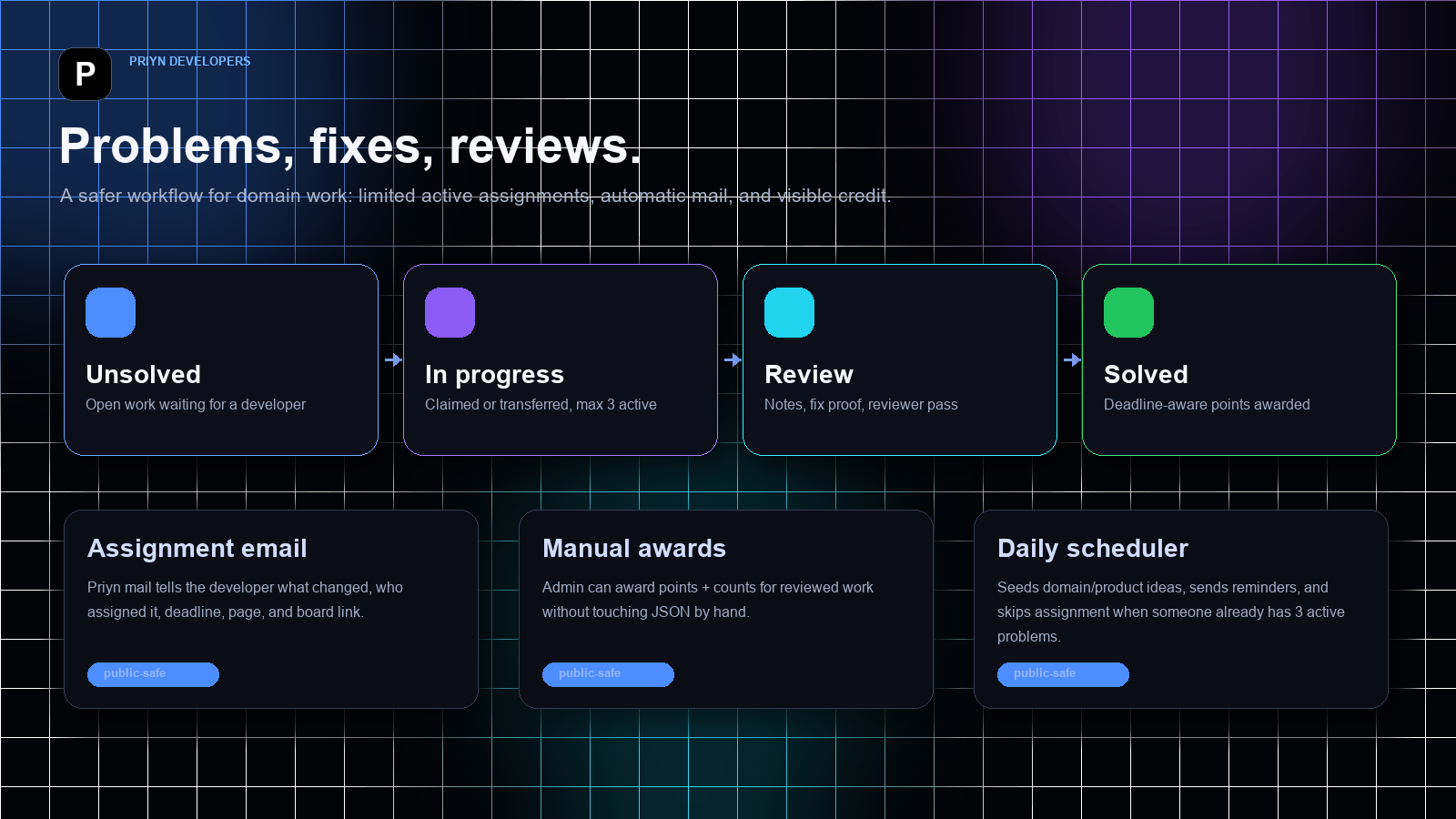
The Priyn Developers board now behaves like a small operating system for problems, assignments, reviews, points, and product discovery.
The developer portal moved from a simple issue list into a structured workflow: separated problem states, max-three active assignments, assignment emails, manual point awards, deadline scoring, and a product backlog for new Priyn systems.
Screenshots & visuals
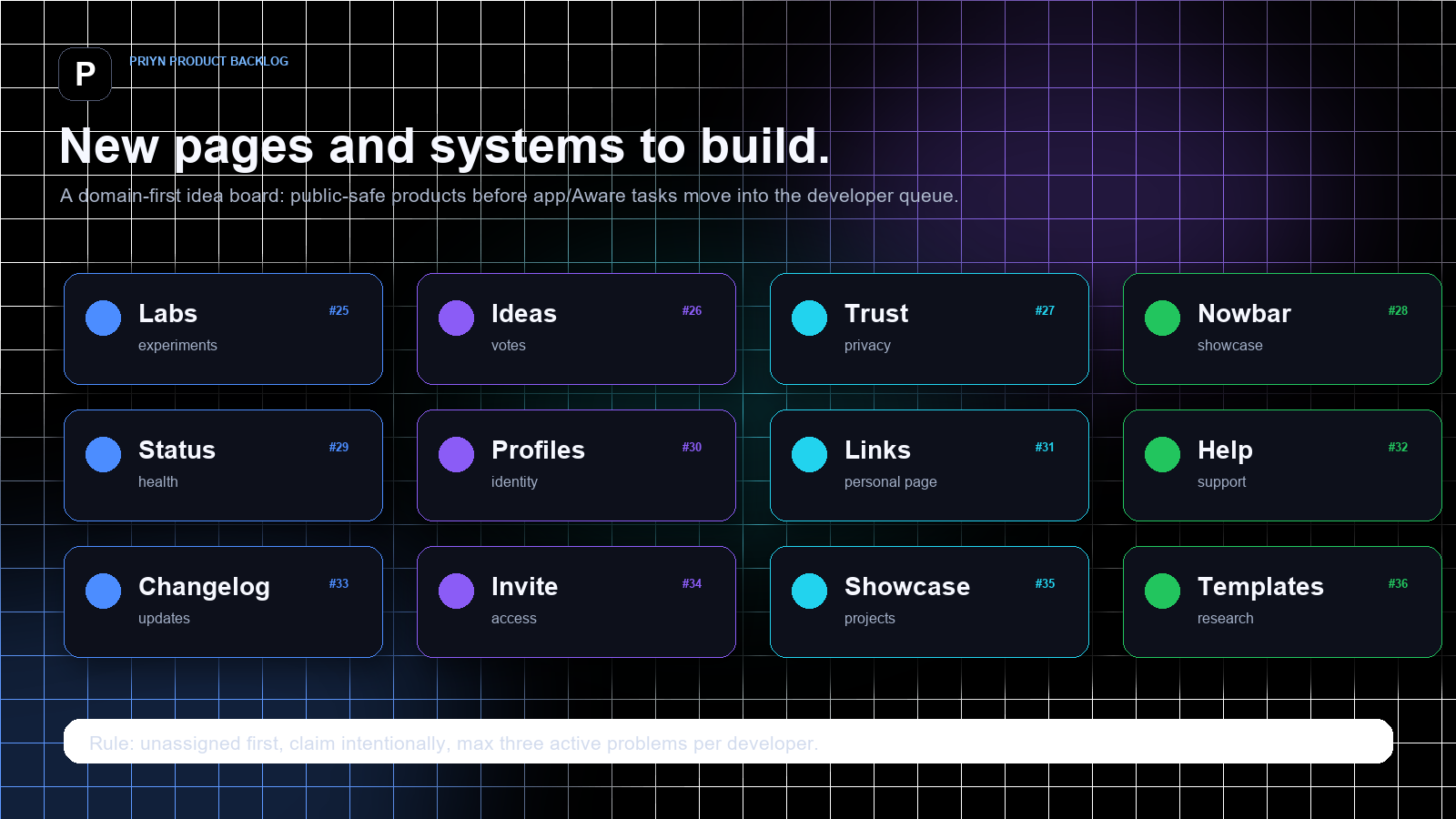
Workflow mapUnsolved, in-progress, review, and solved work now have separate spaces with assignment mail and manual awards around them.Product backlogThe board now includes new page and product ideas such as Labs, Ideas, Trust, Nowbar showcase, Status, Profiles, Help, Invite, and Templates.
Active limit3 per dev
Sections5 states
New ideas12 seeded
Mail pathPriyn sender
Manual creditPoints + count
ScopeDomain first
Notes
Problem: Priyn had work happening everywhere: chat notes, terminal fixes, app experiments, blog changes, login polish, and security review. That is fine for moving fast, but it makes it hard for developers to know what to claim, what is already in review, and what deserves credit.
The first change was separation. The board no longer behaves like one long mixed list. It now groups problems as Unsolved, In progress, Review, Solved, and Closed. Priority sorting still happens inside each group, so critical and high-priority work stays visible without hiding the actual lifecycle state.
The second change was assignment discipline. A developer can hold only three active problems at a time. Active means an assigned issue that is still open, in progress, or waiting for review. This keeps the board from becoming a pile of claimed work that nobody can realistically finish.
Assignment now communicates by itself. When a problem is claimed, transferred, or assigned by the scheduler, Priyn sends a personalized developer email with the issue number, title, priority, deadline, page, and board link. The email uses the Priyn mail helper and the verified developers sender, not a connected personal inbox.
Points are now explicit. Automatic solving still uses deadline-aware scoring, but admin can also award reviewed work manually with a reason, a point amount, and a count. That matters for design review, product suggestions, older completed work, or work that happened before the board existed.
The board now carries historical context too. Priyn platform work, blog work, and reset-page UX review were credited so the leaderboard starts from real contribution rather than pretending the team began at zero today.
The final change was product discovery. The queue now has new priyn.com ideas that are not app/Aware tasks: Labs, Ideas, Trust, Nowbar showcase, Status, Profiles, Links, Help, Changelog, Invite, Showcase, and Templates. These are intentionally unassigned until someone chooses one.
The design rule is simple: the portal should make work visible without turning Priyn into bureaucracy. It should help a developer choose a task, understand the deadline, make progress, ask for review, and receive credit.
Checks
Problem list is separated into Unsolved, In progress, Review, Solved, and Closed.
Critical and high-priority problems stay high inside their section.
Each developer can hold at most three active assigned problems.
Assignment, transfer, and scheduler assignment send Priyn-domain email notices.
Manual awards can grant points plus solved/reviewed/claimed counts with a reason.
Product-discovery problems are open and unassigned until claimed intentionally.
The devlog uses visuals and redacted snippets only; no private data or secrets are exposed.
Implementation Flow
01Post or seed problem
02Sort into lifecycle section
03Claim or transfer if under limit
04Send assignment email
05Move to review or solved
06Award points and counts
Public-Safe Code
Active assignment cap
python · redacted
MAX_ACTIVE_ASSIGNMENTS = 3
def active_assignment_count(portal, username, exclude_issue_id=""):
active_statuses = {"open", "in_progress", "review"}
return sum(
1 for issue in portal["issues"]
if issue["assignee"] == username
and issue["status"] in active_statuses
and issue["id"] != exclude_issue_id
)
def can_assign(portal, username, issue_id=""):
return active_assignment_count(portal, username, issue_id) < MAX_ACTIVE_ASSIGNMENTS
Assignment email contract
text · redacted
To: assigned developer
From: Priyn Developers
Subject: Priyn issue assigned: #number title
Body: title, priority, deadline, page, board link, active-work rule
Rule: send through Priyn mail helper, never through a connected personal inbox.
Issue section rendering
javascript · redacted
const sections = [
["open", "Unsolved"],
["in_progress", "In progress"],
["review", "Review"],
["solved", "Solved"],
["closed", "Closed"]
];
for (const [status, label] of sections) {
renderSection(label, issues.filter(issue => issue.status === status));
}
The dashboard music layer turns NowBar playback into a quiet full-screen video ambience when the user goes idle.
The dashboard music system watches the real NowBar music state, prewarms matching song videos, waits for idle time, then reveals synced dashboard video with adaptive quality and sampled color accents.
Real dashboard music video assetThis is the same kind of song video the dashboard layer uses as the idle visual companion while NowBar keeps audio state.
TriggerAFK reveal
The visual layer waits for inactivity before it opens, so normal dashboard work stays quiet.
SyncNowBar clock
The dashboard video follows the live music state instead of becoming a second player.
QualityAdaptive fallback
Network, viewport, stalls, and buffer health decide which video source should be used.
Notes
Problem: the dashboard already had audio playback through NowBar, but the screen itself stayed visually static. Playing a song should be able to turn the dashboard into a living music surface without interrupting work or forcing a video player in the user's face.
The design rule is that music video must feel ambient, not loud. The dashboard waits until the user is idle before it reveals the matching video layer. If the user moves, types, presses escape, switches tabs, or becomes active again, the video layer hides and the dashboard returns to the normal canvas.
The real system is split into two cooperating modules. NowBar owns music playback, playlists, current track, volume, shuffle, and cross-tab commands. The dashboard music layer reads that state from localStorage and live custom events, then renders only the visual video companion.
The video layer is muted because audio remains owned by NowBar. This keeps one source of truth for playback and avoids double audio. The dashboard video follows the NowBar clock by calculating drift, hard-seeking when the gap is large, and using small playback-rate nudges when the gap is tiny.
Quality is adaptive. The engine looks at network hints, viewport size, current buffer health, recent stalls, and available encoded variants. It chooses a quality target, preloads the selected source, falls back to a lower quality on stalls, and avoids retrying a recently failed source too aggressively.
The dashboard also samples color from the left band of the playing video. Those colors become sidebar accent variables, so the dashboard picks up the mood of the video without manually designing a new palette for every song.
The sampler is intentionally throttled. It does not repaint the dashboard on every video frame. Instead, it reads a tiny strip from the real video at a controlled interval, smooths the values, and writes a few CSS variables that the dashboard can animate cheaply.
The video reveal is also careful about user intent. When the user interacts, the layer fades out and pauses visual work while audio continues normally. When the user becomes idle again, the video resumes from the NowBar clock instead of from wherever the video happened to stop.
Failure handling matters here. If a video is missing, temporarily failed, stalled, or not ready, the system hides the layer rather than showing broken UI. The music can continue playing while the dashboard quietly retries or falls back.
Checks
NowBar stays the audio and playlist source of truth.
Dashboard video appears only after the idle delay.
The video is muted, synced, and visually tied to the active song.
Quality selection adapts to network, viewport, buffering, and stalls.
Sidebar accent colors are sampled from the real video frame.
Broken media hides gracefully instead of blocking the dashboard.
The website's floating command surface: messages, notifications, music, video mail, active calls, and session continuity in one module.
NowBar is the persistent Priyn surface that sits above the site, opens from a collapsed pill into a full panel, and keeps realtime communication, sound, notifications, and calls reachable without leaving the current page.
Notes
Problem: Priyn has several live systems that need to be reachable everywhere: DMs, unread notes, incoming calls, public room knocks, background music, video mail, and active call recovery. A normal page header cannot handle that because the state must follow the user across pages and survive focus changes.
Fix: NowBar boots as a self-contained browser module. It injects its stylesheet and icon layer, fetches a bootstrap payload, builds a floating shell, connects Socket.IO, hydrates DM/music/call state, then renders only the panels that are relevant to the current mode.
The collapsed shell is intentionally small: title, subtitle, status orb, and inline actions when needed. Opening the shell applies the awake state, widens the bar, softens the border radius, reveals tabs, and fades the active panel upward into place. Wheel gestures can cycle modes, while clicks and buttons route to explicit actions.
Messages use optimistic sending and live draft rendering. If a thread is open, incoming messages update the thread directly; if it is closed, the shell shows a notice and can reopen the exact message. Video mail is part of the same DM surface, with recording, import, upload progress, retry state, and fallback viewing for fragile media.
Music is also treated as live state. NowBar keeps a shared music state in local storage, broadcasts commands between tabs, fades volume changes, updates the media session, swaps artwork layers, and can shrink into a mini music controller when the full panel is not open.
Calls are handled as a special mode. Incoming calls expose accept, reject, and open actions in the collapsed shell. Accepted or resumed calls mount a floating video frame with mute, deafen, hangup, drag, resize, and active-call storage so a call can survive page changes.
Safety: public documentation shows architecture, states, and redacted implementation shapes only. It does not include private room ids, personal message bodies, credentials, exact account data, or server-only logic.
Checks
Collapsed pill expands with the cn-awake state.
Panel modes cover messages, notifications, music, and video mail.
Socket events update online users, DMs, calls, public rooms, and join requests.
Local storage keeps active call and music continuity across tabs.
The public demo below loops every visible animation family without exposing private data.
Implementation Flow
01Load CSS and icons
02Fetch bootstrap state
03Build floating shell
04Bind Socket.IO events
05Render active mode
06Persist call/music state
Opening Model
Priyn is liveMessages · calls · sound
MessagesNotesSound
Recent threadOptimistic send, live draft, unread state.
Incoming callAccept, reject, open full video page.
Background syncHeartbeat and storage resume keep state alive.
Floating call
draggable · resizable · resumable
Chat
Live draft and send
Notifications
Notice pop and stack
Music
Visualizer and mini controls
Video mail
Record, upload, retry
Call
Floating call window
Public-Safe Code
Awake and collapse behavior
javascript · redacted
function awaken(pin = false) {
if (!root) return
if (pin) state.pinned = true
root.classList.add("cn-awake")
clearCollapseTimer()
}
function collapseLater() {
if (!root || state.pinned || hasMountedCall() || call.status === "incoming") return
if (root.matches(":hover") || root.contains(document.activeElement)) return
root.classList.remove("cn-awake")
}
The chat moved toward a real mobile messenger: cached, smaller, ordered correctly, and media-aware.
The Android chat UI was refined around message-sized bubbles, recent-first inbox ordering, offline cache, media sending, typing state, and stable scroll behavior.
MessagesPatch rows
ThreadAnchor safe
MediaSoft fail
BlinkRemoved
Notes
Problem: the early chat screen looked stacked and heavy. Conversation rows were too large, message bubbles were not sized to the message, received and sent messages could appear on the same side, and image/video fetches caused visible reloads.
Fix: the conversation model now tracks message direction, recent activity, pinned state, media type, and local cache state. Sent messages align to the right, received messages align to the left, and the inbox orders conversations by latest activity unless a chat is pinned.
The loading model changed too. The app should start near the latest messages, then fetch older history only when the user scrolls upward. Cached messages and thumbnails render first so the screen does not blank while network fetches continue.
Media attachments are moving toward a single gallery picker that supports both photos and videos, visible upload progress, in-chat previews, and deleted placeholders for missing or corrupted media instead of blocking playback popups.
Checks
Message bubbles shrink to content instead of filling the row.
Inbox ordering is latest-first with pin support.
Older history loads while scrolling upward.
Media failures are treated as deleted content, not user-blocking errors.
Calls now need to behave like a communication product, not a separate debug screen.
Priyn calls were rebuilt around chat entry points, ringing states, notification actions, background handling, full-screen video, and picture-in-picture transitions.
StateReducer
AcceptNotification
EndReturn chat
CrashLogged
Notes
Problem: early app calls could open a separate rough screen, get stuck after hangup, crash after accepting, or show video in cramped containers. Notification accept actions also needed to move directly into connection flow instead of waiting on the caller screen.
Fix: call launch is now treated as a state machine: outgoing ringing, incoming ringing, accepted, media starting, connecting, connected, declined, missed, failed, reconnecting, and ended. Each transition has an explicit UI target so the user is not trapped on a stale red screen after hangup.
The video layout was split by context. Inside the app, the remote video fits fully without crop so desktop streams stay visible even when letterboxed. The local camera becomes a draggable picture-in-picture tile that can swap with the remote stream. In Android picture-in-picture, only the remote stream is shown and it may crop to fill the tiny frame.
The next hardening layer is parity with the web call room: mute, deafen, camera toggle, capture, recording hooks, screen-sharing state, YouTube/activity sync, doodle overlays, reconnection handling, and adaptive quality based on network and device performance.
Checks
Calls start only from chat call buttons.
Incoming calls use notification accept/decline actions.
Remote video fits in full-screen call mode and fills PiP mode.
The gallery should feel like a phone gallery, not a paginated file list.
The gallery work focuses on cached thumbnails, stable infinite scroll, video preview loops, pinch-to-density, and full-screen image viewing.
CacheThumbnails
Prefetch4 rows early
VideoVisible only
ScrollNo jump
Notes
Problem: loading more photos could jump the scroll position, pinch zoom could move the user far away from the item they were viewing, and video previews were not reliably starting. Corrupted videos could also throw playback popups that blocked the view.
Fix: cached thumbnails should render first, network fetches should happen before the user reaches the end, and new rows should be appended without stealing scroll focus. Zoom changes should preserve the visible anchor item so the grid density changes around the user's current position.
Videos use viewport-aware preview. A visible video can buffer a short preview, play up to ten seconds, and loop. Videos outside the viewport should pause and release resources so the phone does not heat up.
Full-screen image view is separate from grid browsing. Opening a photo should give a clean full-screen viewer with download support, while the grid uses lower-quality thumbnails when zoomed out to keep scrolling fast.
Checks
Cached media first, network refresh second.
Infinite scroll prefetch without teleporting.
Viewport-only video preview loops.
Pinch zoom changes column count while preserving position.
Implementation Flow
01Read thumbnail cache
02Append next page
03Detect viewport
04Loop preview
05Restore anchor
Public-Safe Code
Viewport preview rule
kotlin · redacted
fun updateVideoPreview(tile: MediaTile, visible: Boolean) {
if (visible && tile.isVideo) tile.preview.playLoop(maxSeconds = 10)
if (!visible) tile.preview.pauseAndReleaseIfIdle()
}
Presence scoring was separated from setup telemetry so one account cannot pollute another account's state.
The Aware service now distinguishes active telemetry, setup-only telemetry, live location, cached location, and the source account used by the scorer.
InputTelemetry
ModeSetup-only
ScorerScoped
Public logRedacted
Notes
Problem: the mobile Aware service needed to upload GPS, Wi-Fi, Bluetooth, and device state, but not every account has a calibrated room-presence model. If every account affected the same scorer, the presence result could become wrong.
Fix: observations include account scope and setup-only metadata. The scorer only uses active telemetry that belongs to the model it is evaluating. Other telemetry can still be stored for future calibration and debugging.
The app map also needed a clearer focus model. Cached location should be labeled as cached, live location should appear with a live outline, and the map should not always force focus back to the phone's current location when the user was trying to view another shared location.
The public version of this log intentionally avoids publishing private device names, exact endpoints, tokens, IP addresses, personal routines, or location history.
Checks
GPS, Wi-Fi, Bluetooth, battery, and device state can be uploaded.
Setup-only telemetry is stored but not scored.
Cached and live location states are visually distinct.
Private telemetry details stay out of public logs.
Implementation Flow
01Receive observation
02Check setup flag
03Match model owner
04Score active signals
05Explain result
Public-Safe Code
Scoped scoring gate
python · redacted
def include_in_presence_score(observation, model_owner):
if observation.meta.get("setup_only"):
return False
if observation.account != model_owner:
return False
return observation.kind in ACTIVE_SIGNAL_TYPES
The app needs to repair itself, report failures, and keep older builds from drifting too far behind.
Priyn Mobile gained version metadata, update checks, background APK downloads, local log buffering, retry upload, and stale-build enforcement.
LogsBuffered
RetryBackground
UpdateManifest
Old buildsForced
Notes
Problem: crashes and network failures were hard to diagnose remotely. The app also needed a way to discover new APK builds from the website and guide the user through installing them without blocking normal use.
Fix: the app records local logs by category and account scope, buffers them when offline, and retries upload in the background. Server-side logs can then be grouped by account and failure type for development.
Update metadata is published with version name, version code, APK URL, and checksum. The app checks after boot and periodically while running. A normal update appears as a dashboard notice; builds that are several versions behind can be forced to update because protocol-sensitive features may no longer match the server.
Downloads run in the background with notification progress. After the APK is saved, Android asks the user to install it; the app does not silently replace itself.
Blog posts accept public comments; devlogs stay focused on code, summaries, and build visuals.
The public Priyn writing pages support blog comments while devlogs stay as clean build notes with code-focused summaries.
CommentsBlog only
DevlogsCode + summary
PrivacyRedacted
StorageJSON split
Notes
Problem: the blog was readable, but readers could not leave feedback directly under a post. Devlogs needed the opposite treatment: no chatter, just structured build history.
Fix: comments are stored in a separate JSON file keyed by blog slug. Authored posts stay in the main pages data file, while visitor comments and replies live in the comments file. Devlogs do not render comment forms.
The comment endpoint accepts normal forms and JSON for blog posts, rate-limits public posting, strips email addresses and phone-like numbers, and uses Jinja escaping when rendering. A hidden field catches simple bot submissions.
This keeps blog discussion open while preserving devlogs as clean engineering artifacts.
Checks
Comments and replies on blog posts.
Separate storage for authored posts and visitor discussion.
Basic rate limiting and public-info redaction.
No comment boxes inside devlogs.
Public-Safe Code
Blog-only comments
python · redacted
if section != "blog":
abort(404)
post = _priyn_find_post(section, slug)
if not post:
abort(404)
Priyn Mobile now treats startup side effects as recoverable instead of letting them crash-loop the app.
Version 0.5.1 hardens app launch by wrapping diagnostics, update checks, worker scheduling, cookie initialization, saved-session restore, and dashboard construction.
Build0.5.1 (24)
Launch pathFail-soft
Crash loopBlocked
APK49 MB
Notes
Problem: the app could crash instantly on open before the first usable screen appeared. Without a connected phone log, the safest fix was to harden every startup side-effect that can fail on a real device.
Fix: Application startup now records failures without throwing, MainActivity routes through safe startup steps, and dashboard construction falls back to sign-in if the saved shell cannot be restored.
Worker scheduling was also made fail-soft. If Android WorkManager is temporarily unhappy, Priyn logs the problem and continues launching instead of dying before the UI exists.
The build was bumped to 0.5.1 (24), signed as a release APK, uploaded to the website, and exposed through the update manifest.
The APK was uploaded, but the app updater needed a public JSON endpoint to see it.
The Android updater reads /api/app/update, so Priyn now exposes a public-safe endpoint that converts the website APK manifest into the exact snake_case fields the app expects.
Endpoint/api/app/update
ResponseJSON
AuthPublic-safe
Current23 -> 24
Notes
Problem: the website download page and raw version JSON were correct, but the Android updater checks /api/app/update. That path was falling into the auth flow and returning a login redirect instead of update metadata.
Fix: the backend now exposes /api/app/update as a rate-limited public endpoint. It reads the static version manifest, compares the caller's current version code, and returns available, version_code, version_name, download_url, size_bytes, sha256, released_at, notes, and required.
The endpoint is safe to keep public because it only describes the downloadable APK and does not reveal private account state.
Devlogs moved from plain articles into dark animated engineering cards with code, metrics, and motion.
Devlog posts now render as focused build artifacts: no comments, animated summary visuals, orbit motion, hover resizing, and code cards.
MotionOrbit + pulse
LayoutResizes cleanly
CommentsNone here
MoodDark + sharp
Notes
Problem: devlogs should not feel like blog comment threads. They are build notes, and they need to show the work with structure: summary, result, code, and a little motion.
Fix: the devlog template now renders visual metric cards and code snippets when a post provides them. The comment section only renders for blog posts.
The CSS adds orbit loops, pulse animation, hover scaling, dark glass cards, responsive metric grids, and reduced-motion fallbacks. The vibe is serious engineering with a tiny wink.
Chat should open at the latest messages, stay stable, and fetch history only when the user climbs upward.
The chat loading model is being shaped around offline cache first, latest messages first, and older history loaded in small upward batches.
CacheOffline first
HistoryPull upward
ReloadsNo blink
InboxRecent first
Notes
Problem: the chat screen could feel like it was rebuilding itself when photos or videos loaded. That kind of redraw breaks trust because the user loses position and the conversation appears to blink.
Fix: the app should render cached conversations immediately, listen continuously for new messages, and only fetch older messages when the user scrolls up. New media should attach into existing rows without resetting the thread.
The inbox order is also tied to activity: recent messages, calls, missed calls, and sent media lift a conversation upward unless the user pins another chat.
Checks
Cached conversations render first.
Thread opens near the latest message.
Older messages fetch in small upward pages.
Incoming updates patch rows instead of reloading the whole screen.
Implementation Flow
01Load cache
02Render latest
03Listen live
04Fetch older
05Patch rows
Public-Safe Code
Thread load contract
kotlin · redacted
fun loadThread(peer: String, before: String? = null) {
val cached = cache.messages(peer)
render(cached, anchor = "latest")
api.messages(peer, before = before, limit = 20) { page ->
mergeWithoutReset(page)
}
}
Photos should arrive before the thumb reaches the end; videos should preview only while visible.
The gallery model uses cached thumbnails, prefetch thresholds, viewport-only video loops, and position-preserving zoom.
PrefetchBefore edge
Video10 sec loop
ZoomAnchor kept
HeatViewport only
Notes
Problem: loading more media could pull the user down to the newest batch. Zooming the grid could also throw the scroll position far away from the photo the user was inspecting.
Fix: the gallery should prefetch before the end, append without stealing focus, and preserve an anchor item during zoom. When the user zooms out, thumbnail quality can drop because more cells are visible at once.
Videos behave like a phone gallery preview: visible videos can play a short loop; offscreen videos pause so battery, heat, and network stay under control.
Checks
Prefetch before the end of the grid.
Append without teleporting scroll.
Pinch zoom preserves the visible anchor.
Visible videos loop a short preview.
Implementation Flow
01Read cache
02Render thumbnails
03Prefetch page
04Play visible videos
05Preserve zoom anchor
Public-Safe Code
Position-safe append
kotlin · redacted
val anchor = grid.firstVisibleMediaId()
items += page.items
adapter.submit(items)
grid.restoreAround(anchor)
if (grid.nearEnd(thresholdRows = 4)) loadNextPage()
Calls need full remote video, a swappable local tile, and background PiP that does not waste pixels.
The call layout separates in-app fit mode from Android PiP crop mode so desktop streams stay visible while background PiP remains readable.
RemoteFull fit
LocalMini tile
PiPRemote only
HangupNo trap
Notes
Problem: desktop video is often wide while phone screens are tall. Cropping inside the app hides important content, but fitting inside Android PiP can become too tiny.
Fix: normal in-app calls use contain-fit for the remote stream. The local camera sits in a small tile and can swap with the remote stream. Background PiP is allowed to crop because the PiP window is too small for full-frame inspection.
The controls should hide on a tap, return on another tap, and never trap the user after a call ends.
Cached location is useful, but the app has to make live sync obvious and resilient.
Aware location work now distinguishes cached state, live GPS, telemetry upload, and map focus behavior.
GPSRetrying
StateLive vs cached
FocusRemembered
ScopeAccount safe
Notes
Problem: a map can show a location and still fail the user's expectation if it is cached. The live outline, timestamp, and sync path all need to tell the truth.
Fix: the app records GPS and telemetry separately, keeps retrying in the background, and labels cached results as cached. The map should remember whether the user was focused on self or shared location instead of snapping back unexpectedly.
The server side keeps account scope attached to every observation so one account's setup data does not mutate another account's presence model.
Files are becoming a separate cloud storage surface, not a second photo gallery wearing a fake mustache.
The files tab is being cleaned into an empty-state list, icon upload control, account-linked file ownership, and separate document browsing.
UploadIcon only
RowsList clean
EmptySay empty
MixingNo photos
Notes
Problem: the files section should not use a loud upload button or mix itself with photos. If there are no documents, it should simply say empty and wait.
Fix: files get their own tab, their own list rows, and a compact upload icon. Ownership stays attached to the signed-in account so documents do not blend with public gallery media.
The visual target is quiet: file icon, name, type, size, uploaded time, and actions. No dashboard clutter, no marketing text, no storage flexing.
YouTube, doodles, screen share, mute, deafen, and recording all need one shared call-room language.
The app call screen is being mapped to the same activity model as the web room so mobile can participate without becoming a second-class client.
Room stateShared
MobileLight UI
ActivitiesSynced
DriftNo thanks
Notes
Problem: the web call room already has richer activity state than the app: YouTube sync, doodles, screen share, mute, deafen, capture, and recording hooks. Mobile needs to understand the same events.
Fix: the shared model should treat activities as room events. The app can render a lighter version, but it should not ignore state just because a feature began on the web client.
The rule is parity of meaning, not identical pixels. A phone can use smaller controls and simpler motion while still respecting the same room state.
The devlogs show how Priyn works without exposing the exact private wiring.
Priyn devlogs use pseudocode, contracts, reducers, and sanitized snippets so readers can understand the engineering without seeing secrets or personal data.
CodeSanitized
SecretsRedacted
LearningPreserved
ScopePublic safe
Notes
Problem: useful devlogs need code. Unsafe devlogs expose too much: credentials, exact private host details, account-specific rules, personal routines, tokens, cookies, and raw logs.
Fix: code cards are written as public-safe excerpts. They show state machines, data contracts, reducers, UI rules, retry behavior, and safety gates, but they avoid deployment-specific values and private identifiers.
The backend also redacts obvious emails, phone-like numbers, token-looking assignments, cookies, authorization strings, passwords, and API-key style values before rendering code blocks.
That gives the public enough to learn from the build without handing over the private system.
Checks
Prefer pseudocode over raw private source.
Show state machines and contracts.
Remove tokens, cookies, host details, and personal identifiers.
Keep exact private configuration out of public pages.
Implementation Flow
01Write excerpt
02Redact sensitive values
03Keep pattern
04Drop private wiring
05Publish safely
Public-Safe Code
Code redaction safety net
python · redacted
def public_code(value):
text = redact_email(value)
text = redact_phone_like_numbers(text)
text = redact_assignments(text, names=["token", "password", "secret", "cookie"])
return text[:MAX_PUBLIC_SNIPPET]
Allowed public excerpt types
text · redacted
OK: state reducer, request shape, retry policy, UI layout rule, cache contract
NO: credentials, exact private hosts, raw personal logs, account-specific secrets